Why Replacing OnGuard Is Even Better When You Combine Visitor Management, Digital Keys, and Incident Management
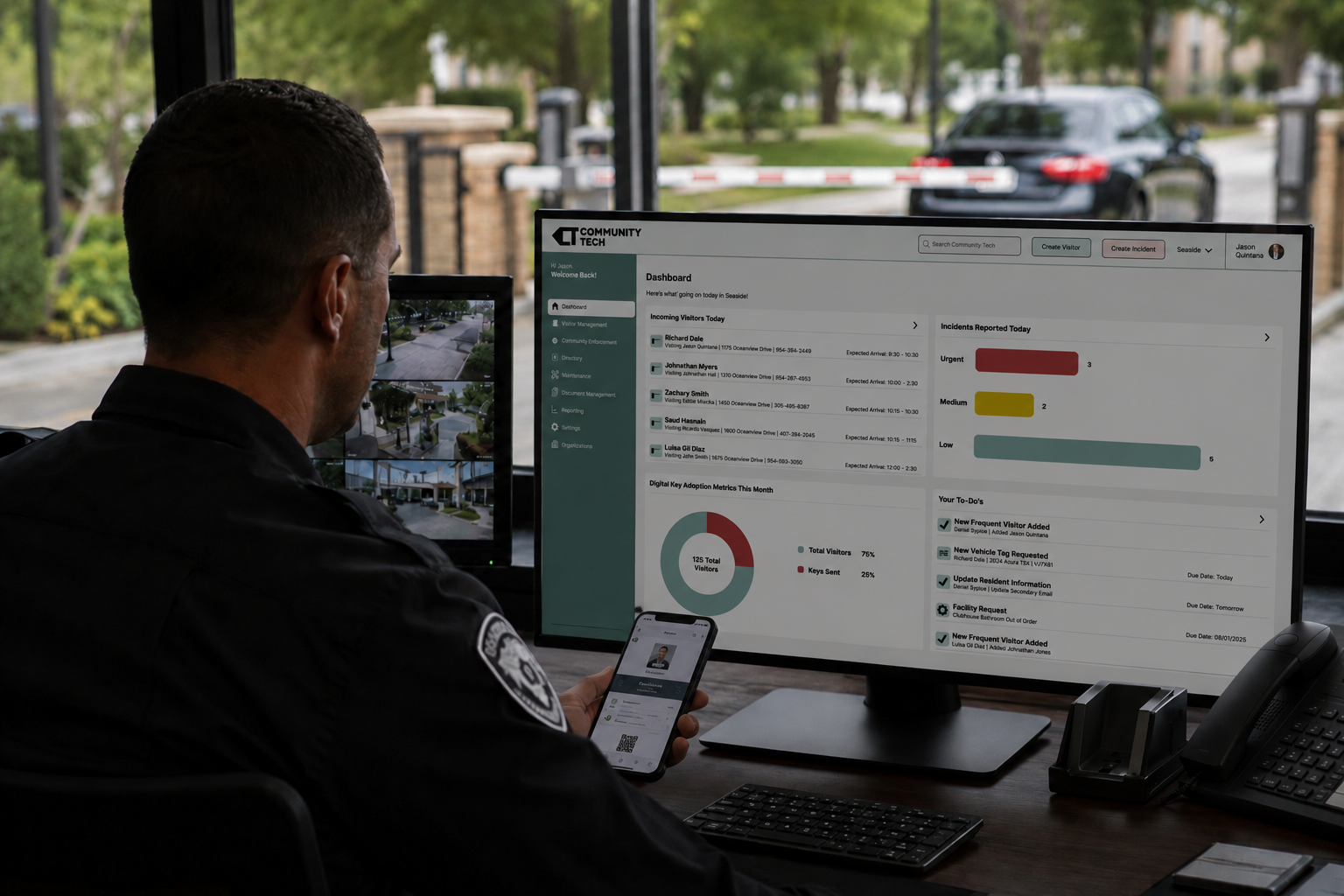
Most security companies start looking for an OnGuard replacement because they need better visitor management. That makes sense. OnGuard has been around for a long time, and for many communities, it has basically served as the system of record for who is allowed through the gate.
But once security teams start looking at more modern options, they usually realize the opportunity is bigger than just replacing visitor management.
They can also get rid of a second system.
For years, a lot of security firms have run their guard gate operations across multiple tools. One system handles visitors. Another handles incident reports, daily activity logs, patrol notes, maintenance issues, and officer documentation.
It works, but it creates a lot of extra steps for guards.
They have to switch between platforms. They have to remember where to log what. Supervisors and property managers end up with information spread across different systems. And the company ends up paying for more software than it probably needs.
That is where a modern platform can make a real difference.
OnGuard Was Built for a Different Version of Security Operations
Legacy systems like OnGuard were mostly built to store visitor information. They help answer basic questions like:
Who is approved?
Who came in?
When did they arrive?
What unit were they visiting?
That is important, but it is only one part of what guards do every day.
A guard at a modern community is also dealing with vendors, deliveries, resident questions, gate issues, unauthorized vehicles, suspicious activity, damaged property, denied visitors, and shift notes. Those things are all connected to the same day-to-day operation, but in many communities they are not tracked in the same place.
That is the real problem.
Visitor management is not separate from incident management. It is often where incidents begin. A visitor gets denied entry. A vendor shows up without approval. Someone damages a gate arm. A resident calls about suspicious activity. A delivery issue turns into a complaint.
When the guard has to leave the visitor management system and open a different tool to document what happened, things get missed. Or they get written down later. Or they never make it into the right report at all.
One Platform Is Easier for Guards and Better for Management
Community Tech brings visitor management, digital keys, incident reporting, and activity logs into one platform.That means guards can work out of one system during their shift instead of bouncing between different applications. They can check in a visitor, verify access, document an issue, and keep the shift record up to date without changing tools.
For the security company, that means less training, fewer logins, fewer support questions, and more consistent reporting across every community they manage. For the property manager, it means they get a cleaner picture of what is actually happening at the property.
Instead of visitor records in one place and incident reports somewhere else, the operational history is easier to follow.
Digital Keys Make the Experience Better for Residents Too
Replacing OnGuard should not only make life easier for guards. It should also make the experience better for residents.
With Community Tech, residents and property managers can send secure digital visitor passes before a guest arrives. The visitor has what they need ahead of time, and the guard can quickly see that they are expected.
That reduces phone calls, manual approvals, and confusion at the gate.
Recurring guests are easier too. Residents can manage Frequent Visitors so approved guests can be handled faster without relying on outdated paper lists, handwritten notes, or permanent guest records that no one remembers to clean up.
It is a better experience for everyone involved: residents, guests, guards, and management.
Incident Reporting Should Be Part of the Same Workflow
Incident reporting should not feel like a separate administrative task that happens after the fact. It should be part of the guard’s normal workflow. If something happens at the gate, the officer should be able to document it right away in the same platform they are already using. That could be a denied visitor, a parking issue, a damaged gate, a resident complaint, a suspicious person, or anything else that needs to be recorded.
When incident reporting is built into the same system as visitor management, the documentation is more likely to happen in the moment. It is also easier for supervisors and property managers to review later.
That is a big improvement over piecing together notes from separate systems.
Less Software Means Less Friction
Every extra platform creates more work.
More training.
More passwords.
More apps.
More support.
More places for information to get lost.
For a security company managing multiple communities, that adds up quickly.
Using one platform makes it easier to onboard new officers, standardize processes across properties, and keep reporting consistent.
It also helps reduce software costs, because the company is not paying for one tool to manage visitors and another tool to document what happened during the shift.
Community Tech Is More Than an OnGuard Replacement
A lot of communities first look at Community Tech because they want to move away from OnGuard. But the bigger value is that Community Tech is not just a newer visitor database. It is built around how guard gates actually operate today.
Visitor management, digital keys, resident access, incident reporting, activity logs, and access history all work together in one place.
That matters because guard gate operations are not just about letting people in. They are about keeping the community organized, informed, and secure.
The Better Question to Ask
If you are evaluating alternatives to OnGuard, the question should not only be: Can this replace our visitor management system?
The better question is: Can this replace multiple systems we use to run our security operation?
That is where the real value comes from.
Replacing OnGuard with a better visitor management tool is a good start. Replacing OnGuard and eliminating the need for a separate incident reporting platform is even better.
Because the goal should not be to swap one database for another. The goal should be to make the entire guard gate operation easier to run.